
Version: Business Enterprise Advanced
Platform: Web Android IOS
Role: User Manager Accountant Administrator
Once an invoice has been created in N2F - Supplier Invoices, it is sent through the validation workflow defined according to the supplier.
From your web interface > ‘Invoices’ menu, you can view the current invoices on your account

To find an invoice (or credit note), you can base your search on its status, but you can also click on ‘All’. You can also narrow your search using the Advanced Search:
By clicking on this option, you can select filters to apply to your search:
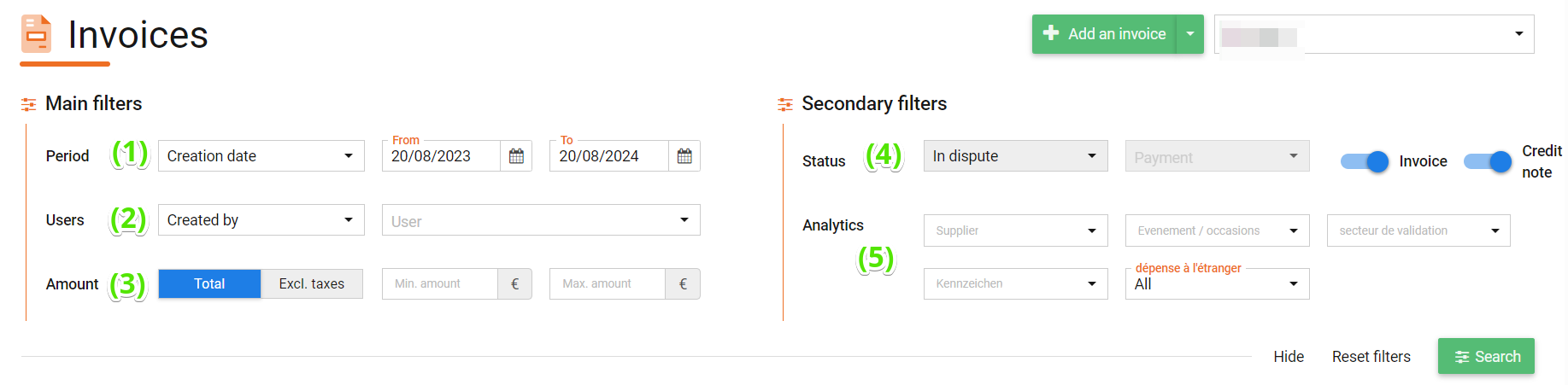
1. The date to be selected is the invoice issue date
2. Who created/submitted/approved or posted the invoice.
3. Enter the amount
4. Select the type of document you are looking for (invoices / credit notes)
5. Enter the analytics if you are looking for an invoice linked to a supplier / event / validation sector, etc.
Once you have defined your search and filters, you can click on ‘Search’.
This is the screen where you can find rejected invoices.
If you have any problems or questions,
Please do not hesitate to contact our support team using the following details:
support@n2f.com