
Version: Business Enterprise Advanced
Platform: Web Android IOS
Role: User Manager Accountant Administrator
Once an invoice has been created in N2F - Supplier Invoices, it is sent through the validation circuit defined according to the supplier.
From your web interface > ‘Invoices’ menu, you can view the invoices (or credit notes) in your account:

These different tabs give you an initial indication of the number of elements present at each step. You can click on ‘All’ to find the element you are looking for and use the simple or advanced search:

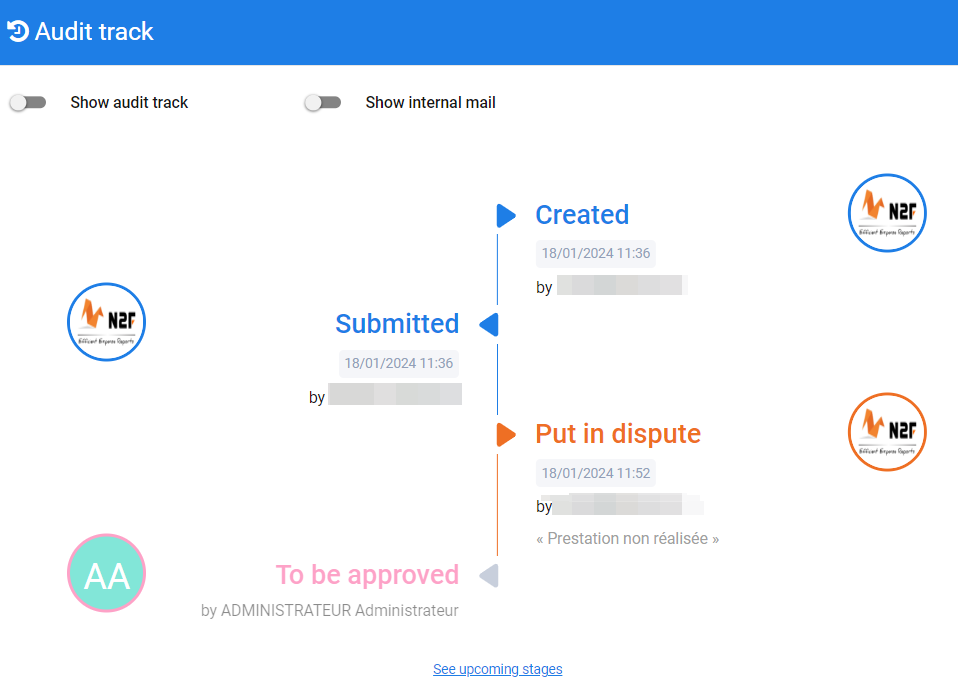
Once you have found the invoice, click on the line to display the invoice details. You can then open the invoice audit track and view the validation steps:


You will see details of the validation and the next steps (click on the “see upcoming stages” option to view all the steps):
If you have any problems or questions,
Please do not hesitate to contact our support team: support@n2f.com